India’s two depositories — NSDL and CDSL — each operate their own online portals that give investors direct access to their Demat account information and transaction capabilities. For NSDL, this portal is called Speed-e, and for CDSL, it is called Easi (short for Easy Access to Securities Information) along with its companion service Easiest (Easy Access to Securities Information and Execution of Secured Transaction). Understanding what these platforms offer and how to use them can significantly enhance your control over your Demat account.
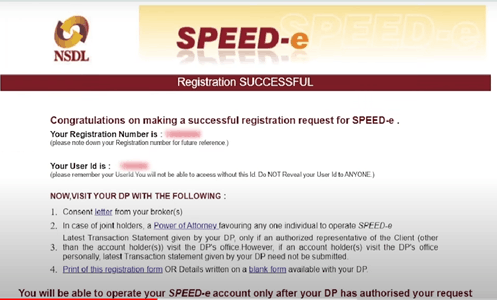
What is NSDL Speed-e?
Speed-e is NSDL’s internet-based platform that allows investors to directly submit delivery instructions and access account information without having to visit or contact their Depository Participant. Launched to reduce the dependency on physical Delivery Instruction Slips and make the transfer process more efficient, Speed-e offers a secure, paperless alternative for authorizing share transfers directly through the depository.
Speed-e is accessible at the NSDL website and requires registration through your DP. Once registered, you receive login credentials that allow you to access your Demat account information and submit transfer instructions online from anywhere.
Key Features of NSDL Speed-e
- Online submission of delivery instructions for off-market and on-market transfers without a physical DIS
- View of complete Demat account holdings and transaction history
- Pledge and unpledge instructions for securities
- Setup of standing instructions for regular transfers
- Email alerts for all debits and credits in the Demat account
- Access to the Consolidated Account Statement
What is CDSL Easi and Easiest?
CDSL’s equivalent to Speed-e is the Easi platform, which stands for Easy Access to Securities Information. Easi provides investors with a read-only view of their CDSL Demat account — they can view holdings, transaction history, account statements, and portfolio valuations but cannot execute transactions through Easi alone.
For transaction capabilities, CDSL offers Easiest — Easy Access to Securities Information and Execution of Secured Transaction. Easiest allows investors to submit delivery instructions, authorize transfers, and execute other account instructions directly online without a physical DIS. Easiest uses an OTP-based authentication system for enhanced security.
How to Register for Speed-e
To register for Speed-e, you need to submit a registration form to your NSDL-registered DP. The DP processes your registration request with NSDL and provides you with a User ID. You then set your password on the Speed-e portal and activate your account. The registration process is straightforward and typically completed within a few business days.
How to Register for CDSL Easi and Easiest
CDSL Easi registration can be done directly online on the CDSL website by entering your Demat account details, PAN, and registered email address. The system verifies your details and sends an activation link to your registered email. For Easiest registration, a similar process is followed with an additional layer of authentication to enable transaction capabilities.
Security Features
Both Speed-e and Easiest incorporate multiple layers of security to protect investor accounts. These include two-factor authentication using OTPs sent to registered mobile numbers, encrypted data transmission, session timeouts, and email and SMS alerts for all transactions. Investors are strongly advised to use strong and unique passwords for these portals and never share their login credentials with anyone including their broker.
Benefits of Using Depository Portals Directly
Using Speed-e or Easi and Easiest directly gives you an independent view of your Demat account that is not filtered through your broker. This is especially valuable for verifying that all your holdings are correctly reflected, checking for any unauthorized transactions, and having direct access to the depository in case of a dispute with your broker.
FAQs
Q. Is there a fee for using Speed-e or Easi and Easiest?
Speed-e and Easi are generally available to investors at no direct charge, though your DP may charge a nominal registration fee. Easiest and Speed-e for transaction submissions may have per-instruction fees depending on your DP's fee structure.
Q. Can I use Speed-e or Easiest to transfer shares to any Demat account?
Yes. You can use these platforms to submit transfer instructions to any valid Demat account — whether NSDL or CDSL — for off-market transfers. For on-market settlements, the instructions are processed through the exchange mechanism.
Q. What should I do if I forget my Speed-e or Easi password?
You can reset your password using the forgot password option on the respective portal, which typically sends a reset link to your registered email address. If you are unable to reset online, contact your DP for assistance.
Q. Can I access Speed-e or Easi on a mobile device?
Both NSDL and CDSL have made their portals mobile-responsive and accessible through web browsers on smartphones. CDSL also has a dedicated mobile app called myEasi that provides similar functionality to the web portal.
Q. If I have accounts with both NSDL and CDSL, do I need to register on both portals?
Yes. Speed-e is exclusively for NSDL accounts and Easi and Easiest are for CDSL accounts. If you hold Demat accounts with both depositories, you will need to register on both platforms separately to access each account.